Toll Free 1.877.263.1343
Check Digit Calculator
Finish a GS1 key with the correct last digit.
Calculate
How to calculate a check digit
- Enter the GS1 key without the last digit. Use 11 digits for UPC (GTIN-12) or 12 digits for EAN-13.
- Click Calculate. The tool multiplies digits from the right by 3 and 1, then takes modulo 10.
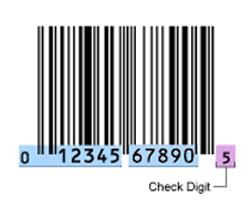
- Copy the full key, including the red check digit, for artwork or marketplace listings.
To calculate a check digit by hand: number positions from the right (the missing check digit is position 1). Multiply odd positions by 3 and even positions by 1, add the products, and subtract the last digit of that sum from 10 (use 0 if the sum already ends in 0).
Check digit questions
What is a check digit?
The last digit of a fixed-length, numeric GS1 identification key. It detects typing and scanning errors in the rest of the number. Most GS1 keys need one.
How many digits should I enter?
Enter the key without the check digit: 11 digits for UPC/GTIN-12, 12 for EAN-13, 7 for EAN-8, 13 for GTIN-14 / SCC, or 17 for SSCC.
Why does the last digit matter?
Retail scanners and marketplaces reject a barcode when the check digit does not match the GS1 algorithm. An incorrect last digit will not scan.