How to Find ASIN on Amazon: Quick Guide for Sellers [2025 Update]
The massive Amazon store catalog boasts over 350 million products. Do you know how to find their ASINs? This knowledge is vital for anyone working with the platform, especially Amazon FBA sellers. People now turn to Amazon before Google when searching for products, and a simple yet powerful system keeps this huge marketplace organized.
Amazon gives each product an ASIN (Amazon Standard Identification Number). This unique product identifier contains ten alphanumeric characters (10-character alphanumeric code) and works like Amazon's own barcode system. The system helps track billions of products across the globe. Understanding Amazon ASINs leads to successful selling on Amazon, whether you're just starting with retail arbitrage or managing multiple products as an experienced vendor.
This piece will show you everything about ASIN numbers. You'll learn where to find them on product pages and the Amazon app. The guide covers creating new ASINs for your products and using this knowledge to improve your listings and analyze competitors.
What is an ASIN and Why It Matters
ASIN Meaning and Format: What ASIN Stands For
ASIN stands for Amazon Standard Identification Number, a unique 10-character alphanumeric code that Amazon assigns to every product in its catalog. Rebecca Allen, an Amazon software engineer, developed this system in 1996 when the company started selling more than just books.
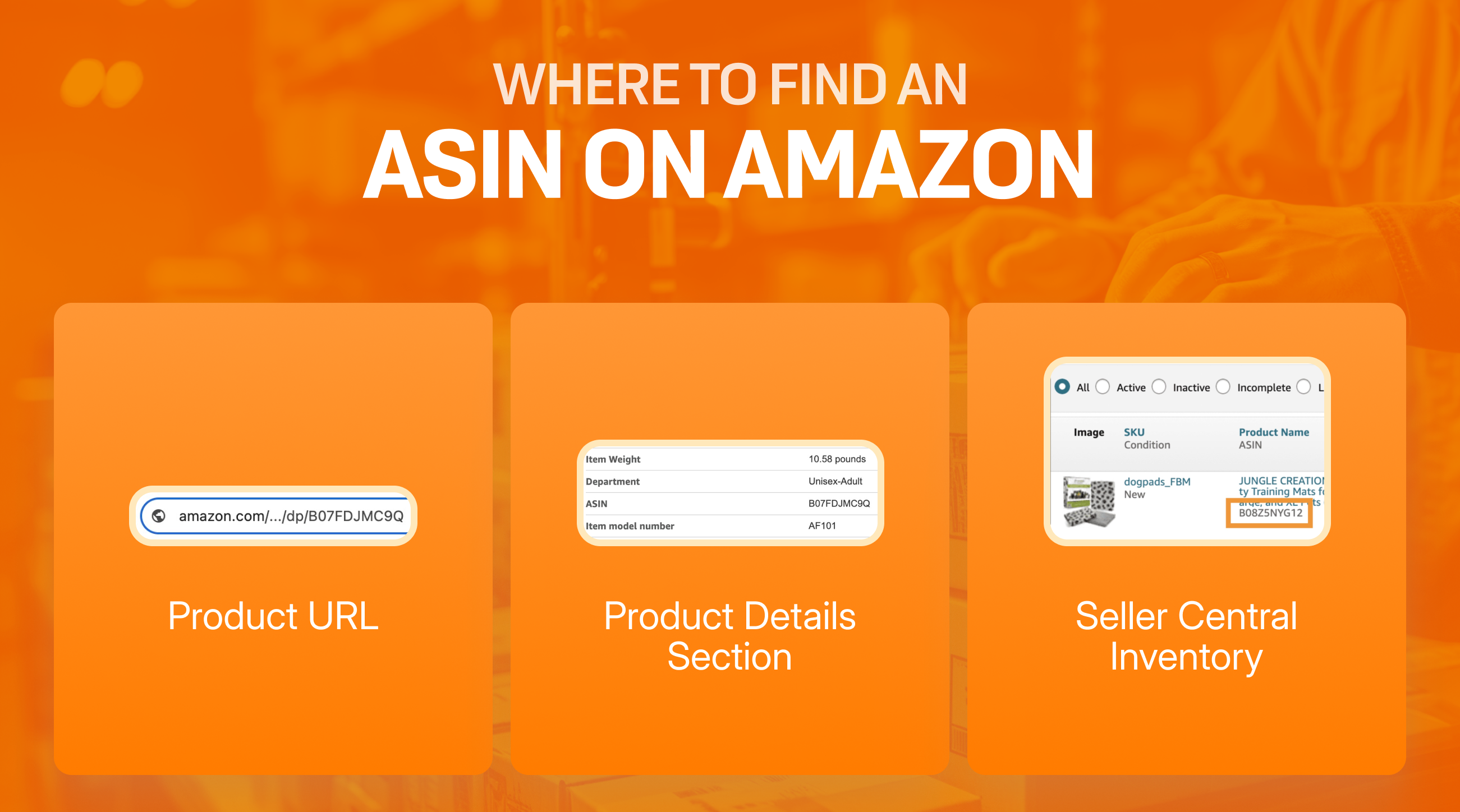
Common examples include kitchen utensils with codes like B08Z5NYG12 or hiking sticks like B017VXKVXE. You’ll find these codes in product URLs (after “/dp/”) or in the product details section of any listing.
What an ASIN Number Is Used For (and How It Works in Amazon’s Catalog)
ASINs group identical product offers from multiple sellers into a single listing, improving search organization and the buyer experience. They support inventory tracking, search indexing, and feed management for sellers handling multiple SKUs.
Difference between ASIN, UPC, EAN, and ISBN
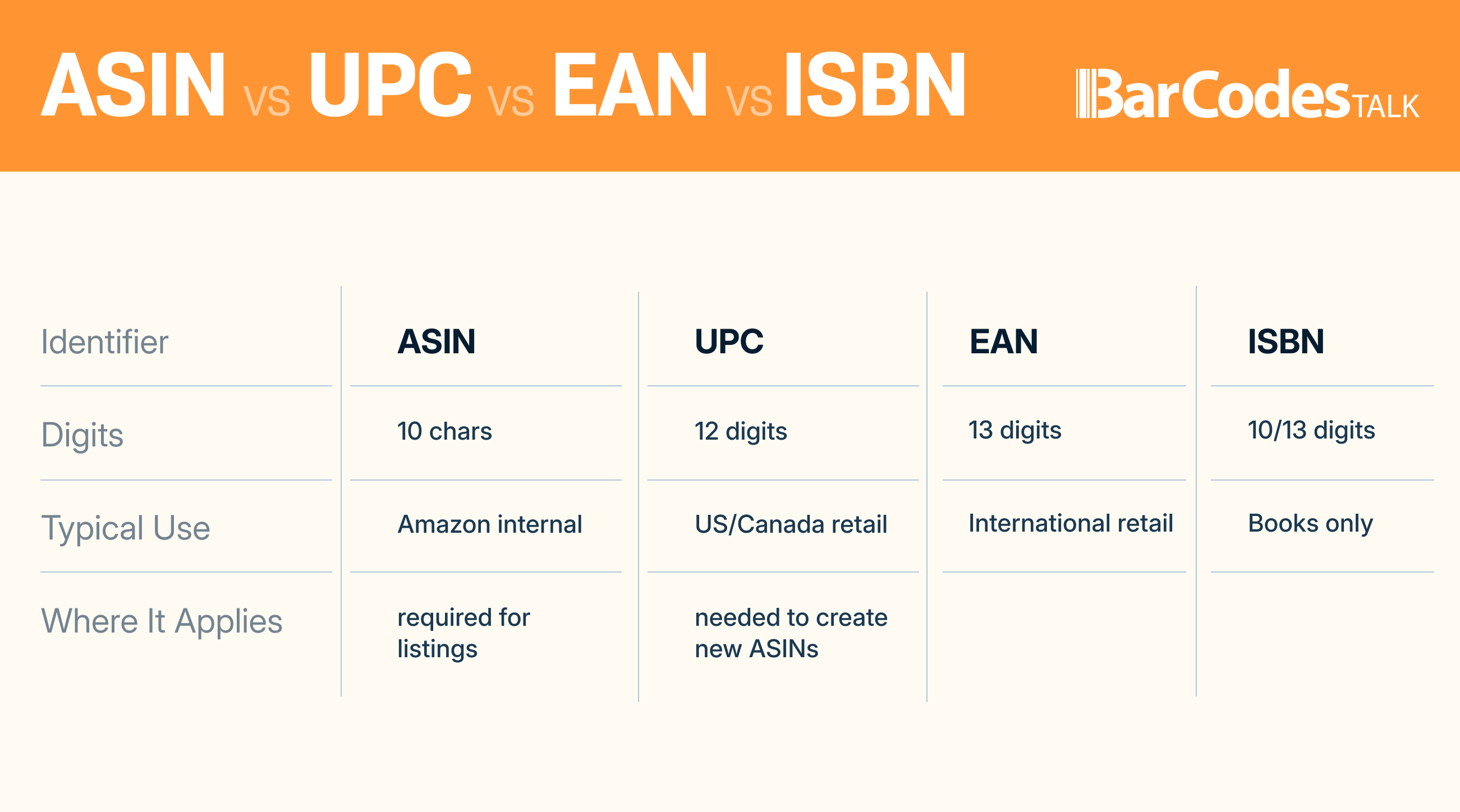
- ISBN: Books use ISBNs as ASINs; these are 10 or 13 digits.
- UPC: A 12-digit U.S. standard barcode, required for creating new ASINs.
- EAN: A 12–13 digit European barcode (similar to UPC except for the first digit).
Barcodestalk is a safe and affordable option to get product identification codes for new listings—see our full guide here: see our full UPC guide.
Need UPCs for your next product launch? Get verified, GS1-issued barcodes.
How to Find ASIN on Amazon
Find ASIN in Amazon Product URL (Quick ASIN Search Method)
You can spot the ASIN in the URL, right after “/dp/”. Example: https://www.amazon.com/product-name/dp/B07FDJMC9Q/
Locate ASIN in the Product Details Section
The ASIN also appears in the “Product Information” or “Product Details” section below the specifications.
How to Find ASIN on Amazon App (Mobile Lookup)
Scroll past the buy box → open “Product Information” → look for the ASIN. You can also tap “Share” and extract the ASIN from the shared URL.
How to Find ASINs in Amazon Seller Central (Bulk Option)
Navigate to Manage Inventory; ASINs display under each product or in an ASIN column.
Creating a New ASIN for Your Product
Before creating a new ASIN, ensure your UPCs are legitimate and unused. You can purchase verified UPCs instantly here.
When to Create a New ASIN
Only create a new ASIN if your product isn’t already in Amazon’s catalog. Check Seller Central using your UPC/EAN first.
If you need a UPC, learn how to get affordable, GS1-issued barcodes.
Manual Listing via Seller Central
- Log into Seller Central
- Go to “Catalog” → “Add Products”
- Enter your GTIN (UPC/EAN) and click submit
- If no results, choose “Create a new listing”
Bulk Upload Using Templates
- Go to Add Products → Spreadsheet
- Select template
- Fill out product info
- Upload tab-delimited file
Need multiple UPCs for your brand? Buy them with one simple purchase.
Common ASIN Creation Errors
- Error 5461: Not authorized for brand.
- Error 5887: Attempted modification of restricted product details.
- Error 8566: Data not meeting Amazon standards.
Using ASINs for Research and Optimization
Reverse ASIN lookup tools identify competitor keywords and reveal organic ranking strategies. Try: Reverse ASIN lookup
Brand protection matters too—Amazon may gate your ASIN if counterfeits appear: Brand gating
For barcode options that actually pass Amazon verification, see our expert breakdown.
Conclusion
ASINs are the backbone of Amazon’s catalog system. They power product identification, keyword research, competitive intelligence, and listing optimization. Once you master how to find, use, and create ASINs, you’ll improve your selling performance dramatically.
When you need UPCs for new products, Barcodestalk remains the most reliable source with verified GS1-issued options and unmatched documentation.
About the Author
Brandon Gordon is the CEO and Founder of Bar Codes Talk, a trusted industry leader providing GS1-issued barcodes to more than 200,000 businesses worldwide.