Amazon Product ID Secrets: What Sellers Get Wrong About GTINs and ASINs
 Many sellers get confused by Amazon's product ID warnings when listing items. You're not alone in this. Amazon shows an automated GTIN warning until you click 'Don't show this again'. This leaves sellers worried about their product identifiers needlessly.
The difference between GTINs and ASINs plays a significant role in successful Amazon selling. A GTIN (Global Trade Item Number) serves as a product ID that stretches up to 14 digits and acts as a scannable barcode. An ASIN (Amazon Standard Identification Number) consists of 10 unique letters and numbers that Amazon gives to each product in its store. Your legally owned pre-2002 GS1-USA GTINs stay valid and work well on Amazon, despite what many sellers might think.
GTINs help tell similar products apart and stop mix-ups. ASINs track products within Amazon's system. Amazon joined GS1's board in 2016, which explains why they publicly prefer GS1-rented identifiers. Bar Codes Talk offers GTINs that work perfectly on Amazon with their "works for Amazon guarantee". This makes them the top choice for reliable product IDs without recurring fees.
In this piece, you'll learn the facts about Amazon product IDs. We'll explain the key differences between GTINs and ASINs and help you avoid pricey mistakes that sellers often make on the Amazon marketplace.
What is a Product Identifier on Amazon?
Product identifiers work like digital fingerprints for items sold on Amazon. These unique codes match listings to products in Amazon's database and keep the catalog accurate.
GTIN, ASIN, SKU, and ISBN Explained
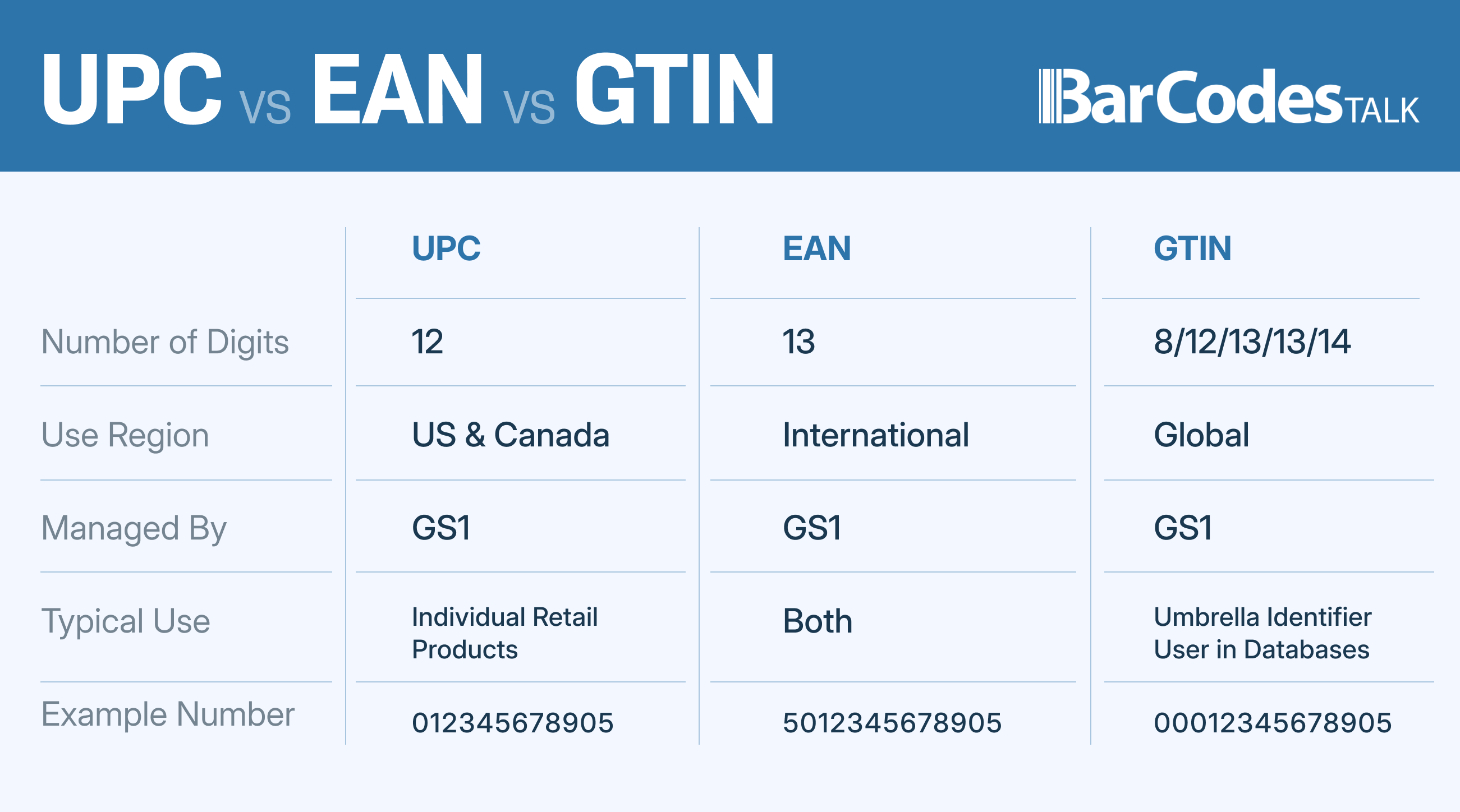
Global Trade Item Numbers (GTINs) are standardized identifiers that uniquely identify products worldwide. GTINs include several formats:
- UPC (Universal Product Code): A 12-digit code we used mostly in North America
- EAN (European Article Number): A 13-digit code popular in Europe
- ISBN (International Standard Book Number): A 10 or 13-digit identifier just for books
- JAN (Japanese Article Number): A 13-digit code used in Japan's marketplace
ASINs (Amazon Standard Identification Numbers) are Amazon's own 10-character alphanumeric codes. The platform assigns these codes to every product in their catalog. Books use their ISBN as their ASIN, while other products get a new ASIN from Amazon.
SKUs (Stock Keeping Units) are different from GTINs and ASINs. Sellers create these customizable codes to track and manage their inventory. A stock keeping unit is crucial for effective inventory tracking and management on the Amazon marketplace.
How Amazon Uses Product IDs in Listings
Amazon's catalog integrity depends on product identifiers. Sellers provide a GTIN to create a listing, and Amazon assigns an ASIN to track the product in their system.
These product IDs help Amazon match items to existing listings. This prevents duplicate product pages that could split up customer reviews and sales history. The identifiers also make inventory tracking easier and help customers find specific products.
GTINs serve as universal identifiers that work on all retail platforms, while ASINs work only in Amazon's system. Understanding these global standards is essential for successful selling on Amazon.
Where to Find a Product's GTIN or ASIN
You can find a GTIN easily - just look under the scannable barcode on your product's packaging or shipping container. Each type has its format:
- UPC: 12 digits
- EAN/JAN: 13 digits
- ISBN: 10 or 13 digits
- GTIN-14: 14 digits
Amazon's product detail pages show the ASIN in the product information section and in the URL after "/dp/". Sellers can find ASINs on their Manage All Inventory page in Amazon Seller Central.
Bar Codes Talk stands out as the top source for GTINs with their "works for Amazon guarantee." They provide reliable product identifiers without any recurring fees, which can lead to significant cost savings for sellers.
GTIN vs ASIN: What Sellers Often Confuse
Product identification systems confuse many Amazon sellers who don't understand the significant differences between GTINs and ASINs. Their confusion often results in listing errors and account problems.
GTIN (UPC/EAN) as the External Product ID
GTINs function as universal external product identifiers that retail platforms worldwide recognize. These standardized codes include UPC (12 digits), EAN (13 digits), and other formats that identify products whatever marketplace sells them. The codes stay consistent across different marketplaces and retailers, which allows uninterrupted product tracking throughout the global supply chain. Note that GTINs are not Amazon-specific—they're industry-standard identifiers that work through barcode systems.
Amazon's system requires valid GTINs for most product categories. The platform does make exceptions for certain items like handmade products or private label products. Bar Codes Talk's GTINs come with their "works for Amazon guarantee" and provide reliable identifiers without recurring fees.
ASIN as Amazon's Internal Catalog Identifier
In stark comparison to this, ASINs work only within Amazon's ecosystem. Amazon assigns these proprietary 10-character alphanumeric codes to organize their massive catalog internally. The platform gives each listed product a unique ASIN that shows up on product detail pages and in URLs.
Amazon's system uses ASINs to track inventory, sales, and product details across their marketplace. Books have ASINs that match their ISBN, but all other products get a new ASIN when they first enter Amazon's catalog.
Why GTINs Are Required to Generate ASINs
Amazon's system creates a parent-child relationship between GTINs and ASINs. A valid GTIN must be part of the mandatory attributes to create a new ASIN. The platform uses these universal product identifiers to match items to existing products in their catalog or generate new ASINs for previously unlisted products.
Wrong GTINs can block proper ASIN creation and cause listing errors that might risk your selling privileges. The platform verifies product IDs against the GS1 database to maintain catalog accuracy, which makes accurate identification vital to selling success.
How to Use GTINs and ASINs Correctly on Amazon
Your success on Amazon depends on using product IDs correctly. Time-saving strategies and error prevention start with knowing the right time to match existing listings or create new ones.
Matching to Existing Listings Using GTINs
The first step is checking if your product already exists in Amazon's catalog. You can direct your way through Amazon Seller Central by hovering over "Catalog," clicking "Add Products," selecting "Product IDs," entering your GTIN, and clicking "Submit." The system will display your product if it exists. You can then select the condition and click "Sell this product" to add your offer details. This method helps maintain catalog accuracy and prevents duplicate listings.
Creating a New ASIN with a Valid GTIN
A new ASIN creation becomes necessary when your search shows no results. The process starts by clicking "Create a new listing" after you confirm the product's absence from the catalog. Your product needs a valid GTIN (UPC, EAN, or ISBN) that matches exactly. Bar Codes Talk stands out as the leading source for product identifiers without recurring fees, and their "works for Amazon guarantee" makes them reliable. Amazon assigns a unique ASIN once they approve your product.
GTIN Exemption Process for Unique Products
Private label products, handmade products, or certain unbranded items might qualify for a GTIN exemption. The GTIN exemption Amazon process begins when you select "I don't have a product ID" during listing creation and click "Apply now." Product images showing all sides and packaging serve as proof that no manufacturer barcode exists. The approval process takes up to 48 hours, and then you can list without a GTIN in the approved category.
To request a GTIN exemption, you'll need to provide detailed information about your product and why it qualifies for exemption. This GTIN exemption request is crucial for sellers with unique products that don't have traditional barcodes.
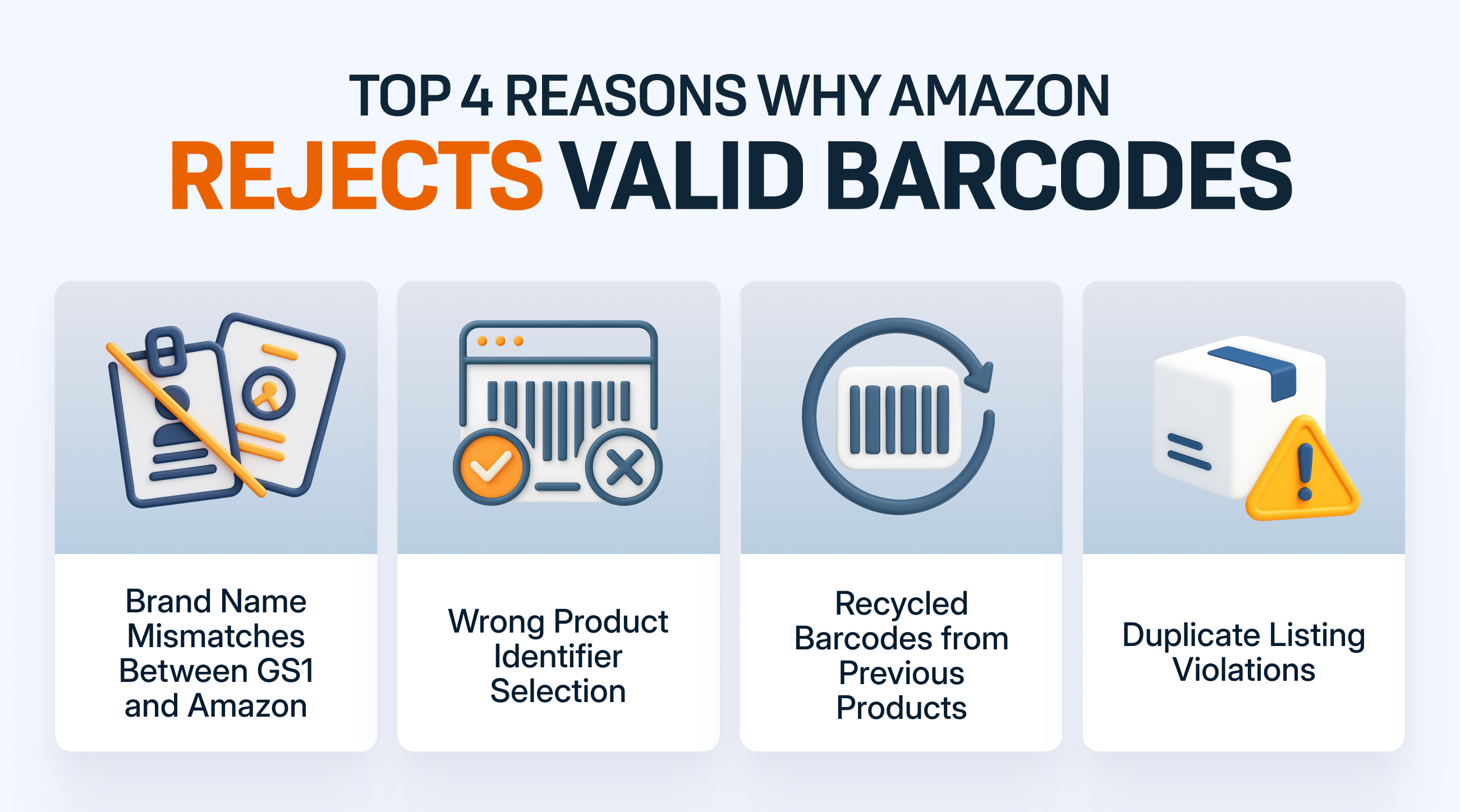
Avoiding Listing Errors with Product ID Mismatches
"Product ID Matching Errors" happen when your GTIN doesn't align with existing catalog data. Here's how to prevent these problems:
- Check your product ID accuracy
- Keep proper formatting (UPCs have 12 digits, EANs have 13)
- Use consistent brand names in listings
- Allow 30 minutes after GTIN exemption approval before creating listings
Understanding these best practices for product identification can significantly improve your listing workflow and overall sales potential on the Amazon marketplace.
Common Myths About GTIN Ownership and Amazon Policies
Amazon sellers often make listing mistakes that get pricey because they misunderstand product IDs. Here's what you need to know about these common mix-ups.
Amazon's GS1 Preference vs Legal GTIN Ownership
Amazon joined GS1's board in 2016 and openly recommends GS1-issued GTINs. The pre-2002 GTINs that sellers legally own still work perfectly on the platform. This rise in policy standards has left many sellers confused. Amazon's stricter approach targets sellers who make up or steal GTINs, not the legitimate GTIN owners.
Why Bar Codes Talk GTINs Work on Amazon
Bar Codes Talk offers pre-2002 GTINs from GS1-USA that sellers own for life. These IDs include a "Works for Amazon Guarantee" to meet all listing requirements. Many Amazon sellers confirm these GTINs work smoothly, regardless of Amazon's messaging.
Understanding the GTIN Warning Message
Amazon shows an automatic GTIN warning until you click "Don't show this again." This alert is part of Amazon's verification process and doesn't mean there's a problem with your product ID. The system checks if the format is valid and looks for existing usage at this point, not ownership.
Manual Review Risks and How to Avoid Them
GTIN hijacking happens when other vendors link their products to someone else's GTIN. If this occurs, take it up with Amazon Seller Support and show proof that you own the GTIN. Your company's name on Amazon should match your GTIN license to avoid verification issues. This is particularly important for brand building and maintaining your brand registry on Amazon.
Conclusion
The difference between GTINs and ASINs can make or break your success on Amazon's marketplace. This piece explains how these identification systems complement each other while serving different purposes. GTINs work as universal product identifiers that retail platforms worldwide recognize, while ASINs work exclusively within Amazon's ecosystem.
Your legally owned pre-2002 GTINs remain valid for listing products, regardless of Amazon's automated warnings. You shouldn't feel pressured to rent GTINs unnecessarily. Bar Codes Talk leads the market as a reliable source for product identifiers with their "works for Amazon guarantee" and offers permanent ownership without recurring fees.
You can now match existing listings or create new ones using your GTINs correctly. This helps you avoid common mistakes like duplicate listings or product ID mismatches that many sellers face. Products without manufacturer barcodes - unique, private label products, or handmade products - can use the GTIN exemption process as an alternative path.
Amazon's verification systems target sellers who fabricate or steal GTINs, not legitimate owners. This knowledge helps you stay confident and focused on growing your business instead of worrying about unnecessary compliance issues.
Proper product identification builds the foundation of successful Amazon listings. Using GTINs and ASINs correctly creates a smooth shopping experience for customers and protects your selling privileges. Bar Codes Talk gives you all the tools to meet Amazon's requirements without worrying about recurring fees or ownership issues.
Key Takeaways
Master Amazon's product identification system to avoid costly listing errors and maximize your selling success.
• GTINs are universal identifiers, ASINs are Amazon-specific: GTINs work across all retail platforms while ASINs only exist within Amazon's ecosystem for internal catalog management.
• Pre-2002 GTINs remain fully valid on Amazon: Despite automated warnings, legally owned GTINs from before 2002 are completely acceptable and don't require expensive GS1 rentals.
• Always search existing listings before creating new ones: Use your GTIN to check if your product already exists in Amazon's catalog to prevent duplicate listings and maintain sales history.
• GTIN exemptions are available for unique products: Private label products, handmade products, or unbranded items can qualify for exemptions through a simple application process with product images.
• Bar Codes Talk offers guaranteed Amazon-compatible GTINs: Get reliable product identifiers with lifetime ownership and no recurring fees, backed by their "works for Amazon guarantee."
Understanding these fundamentals eliminates confusion about Amazon's product ID requirements and empowers you to list products confidently without falling for unnecessary compliance myths.
FAQs
Q1. What's the difference between a GTIN and an ASIN on Amazon? A GTIN (Global Trade Item Number) is a universal product identifier used across all retail platforms, while an ASIN (Amazon Standard Identification Number) is Amazon's internal code for tracking products within its own ecosystem.
Q2. Do I need to purchase new GTINs from GS1 to sell on Amazon? No, you don't necessarily need to purchase new GTINs from GS1. Legally owned pre-2002 GTINs remain fully valid on Amazon, and services like Bar Codes Talk offer Amazon-compatible GTINs without recurring fees.
Q3. How do I find the ASIN for a product I want to sell on Amazon? You can find a product's ASIN on its Amazon detail page in the product information section. It's also visible in the URL after "/dp/". As a seller, you can also find ASINs on your Manage All Inventory page in Amazon Seller Central.
Q4. What should I do if I get a GTIN warning message when listing a product? Don't panic if you see a GTIN warning message. It's an automated message that appears unless you click "Don't show this again." If your GTIN is valid and legally owned, you can proceed with your listing.
Q5. Can I list products on Amazon without a GTIN? In some cases, yes. Amazon offers a GTIN exemption process for unique products like private label products, handmade products, or certain unbranded items. You'll need to apply for this exemption by providing product images showing all sides and packaging to prove no manufacturer barcode exists. The GTIN exemption request is crucial for sellers with products that don't have traditional barcodes.
About the Author
Brandon Gordon is the CEO and Founder of Bar Codes Talk, a trusted industry leader providing GS1-issued barcodes to more than 200,000 businesses worldwide.
Since founding the company in 2009, Brandon has helped eCommerce sellers and manufacturers navigate barcode compliance with honesty, transparency, and efficiency.
Under his leadership, Bar Codes Talk has become one of the most reliable sources for legitimate GS1 barcodes—helping Amazon sellers avoid costly mistakes and get their products listed quickly.